
How Do I Create a Clock Number and Slate?
A clock number is a unique identification number for video files submitted for television. (It's why you might hear the terms 'clocked ad' or 'reclocking' during the clearance process.)
It's used to name and identify a specific video file. Once a clock number is applied to a file and submitted for clearance, that file can't be changed without also changing the clock number. That's worth remembering – it's why we always recommend sending a rough cut of your ad for clearance and advice from your Clearcast contact first. If you need to make a change, it's much easier to do before a clock number is attached.
How you get a clock number
You (the agency or advertiser) create the clock number. Clearcast assigns the first section – your three-letter agency code – when you first register. You'll find it in your 'Welcome to Clearcast' email, and it fills in automatically when you create a new submission in The Library.
Clock number formats
The format depends on what you're submitting. There are three.
Short-form (ads under five minutes)
AAA/BBBB123/456
- AAA – your three-letter agency code, assigned by Clearcast.
- BBBB123 – the middle section: four letters followed by three numbers, created by you.
- 456 – the duration, as three digits (for example, 030 for a 30-second ad).
Long-form (teleshopping and ads over five minutes)
AAA/BBBB12/3456
- AAA – your three-letter agency code.
- BBBB12 – the middle section: four letters followed by two numbers, created by you.
- 3456 – the duration, as four digits (for example, 1800 for a 30-minute ad).
Sponsorship idents
Sponsorship idents use a variant of this format called the Standard Sponsorship Identifier (SSI). An 'S' is added at the front to mark the material as sponsorship.
SABC/ABCD001/10
- SABC – an 'S' marking the material as a sponsorship ident, followed by your three-letter agency code.
- ABCD001 – the four characters you choose (for example, advertiser and product, or programme and sponsor), followed by the version number.
- 10 – the duration, shown as two digits (for example, 10 for a 10-second ident). Unlike standard clock numbers, the SSI duration uses the seconds value directly, and sponsorship idents don't run longer than 60 seconds.
You generate the SSI yourself in The Library. For a step-by-step guide, see About the Standard Sponsorship Identifier (SSI).
In every format, the duration is the length of the ad itself. It doesn't include the clock slate or any black screen before or after the ad.
Choosing your letters and numbers
For standard clock numbers (short-form and long-form), the middle section is yours to create:
- The four letters should be relevant to the campaign, agency, client or product. For example, for a summer campaign for a biscuit company, you might choose 'BISC'.
- The numbers should be sequential – 001, 002, 003 for short-form, or 01, 02, 03 for long-form. So your three biscuit ads could be BISC001, BISC002 and BISC003.
This sequence isn't mandatory – you can use your own internal numbering system, as long as the format stays consistent.
Important notes
Slate QC check – once your clocked ad is submitted, The Library runs a Slate QC check to make sure the clock number on the clock slate matches the clock number in your submission details. If they don't match, the ad fails Slate QC and you'll need to resubmit the corrected file.
Clock numbers are permanent – once a clocked ad passes the full QC process in The Library, the clock number is permanently attached to the video and can't be changed, even if the ad hasn't yet reached the ingest team or your exec.
Creating a clock slate
A clock slate is an essential part of your submission. It identifies and tracks the video file, and makes sure the clock number in the file matches your submission details.
Design and content
Your clock slate can be any design you like, but it must show the clock number in capital letters, clearly visible while the countdown clock runs before your ad starts. The clock number on the slate must match the clock number on your submission.
It's helpful to include:
- Clock number – the clock number of your ad.
- Title – the ad campaign title.
- Agency – the agency handling the submission.
- Duration – the length of the ad.
- Format – the video format (for example, MP4 or MOV).
- Audio – details about the audio (for example, silent or intentionally quiet).
- Date – the date of the clock slate or submission.
Clock slate timing
Follow this timing structure when preparing your clock slate and ad file:
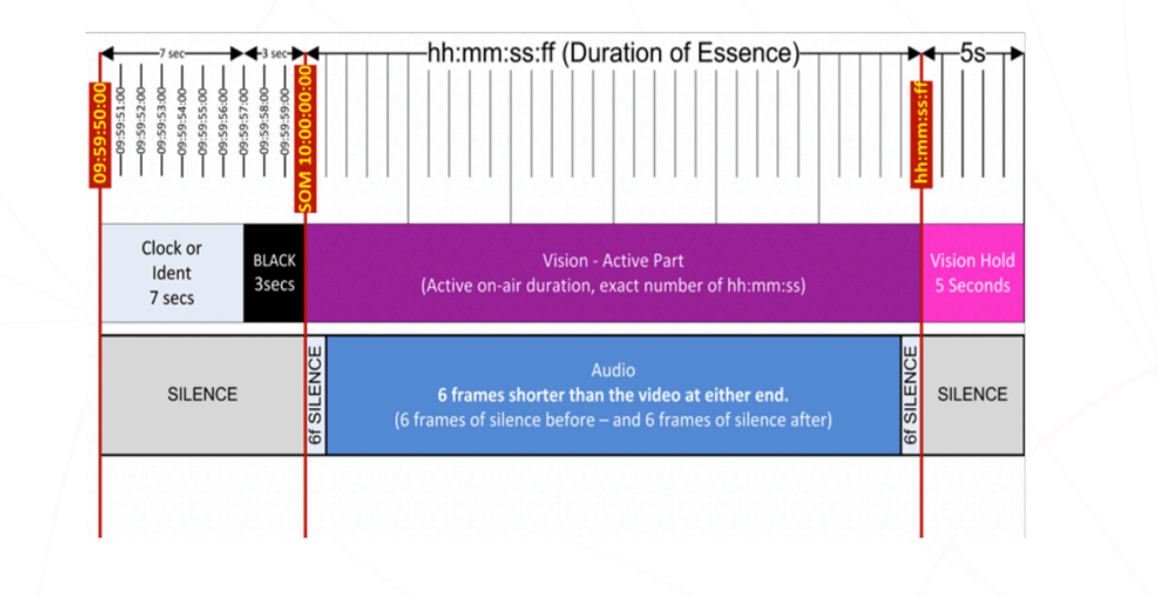
- Clock display – 09:59:50:00 to 09:59:56:24
- Black screen – 09:59:57:00 to 09:59:59:24
- Ad starts – 10:00:00:00
For example:
- 7 seconds of clock – 09:59:50:00 to 09:59:57:00
- 3 seconds of black screen – 09:59:57:00 to 09:59:59:24
- Active ad vision starts – 10:00:00:00
- 6 frames of silence – immediately after the ad vision starts
Example clock slate
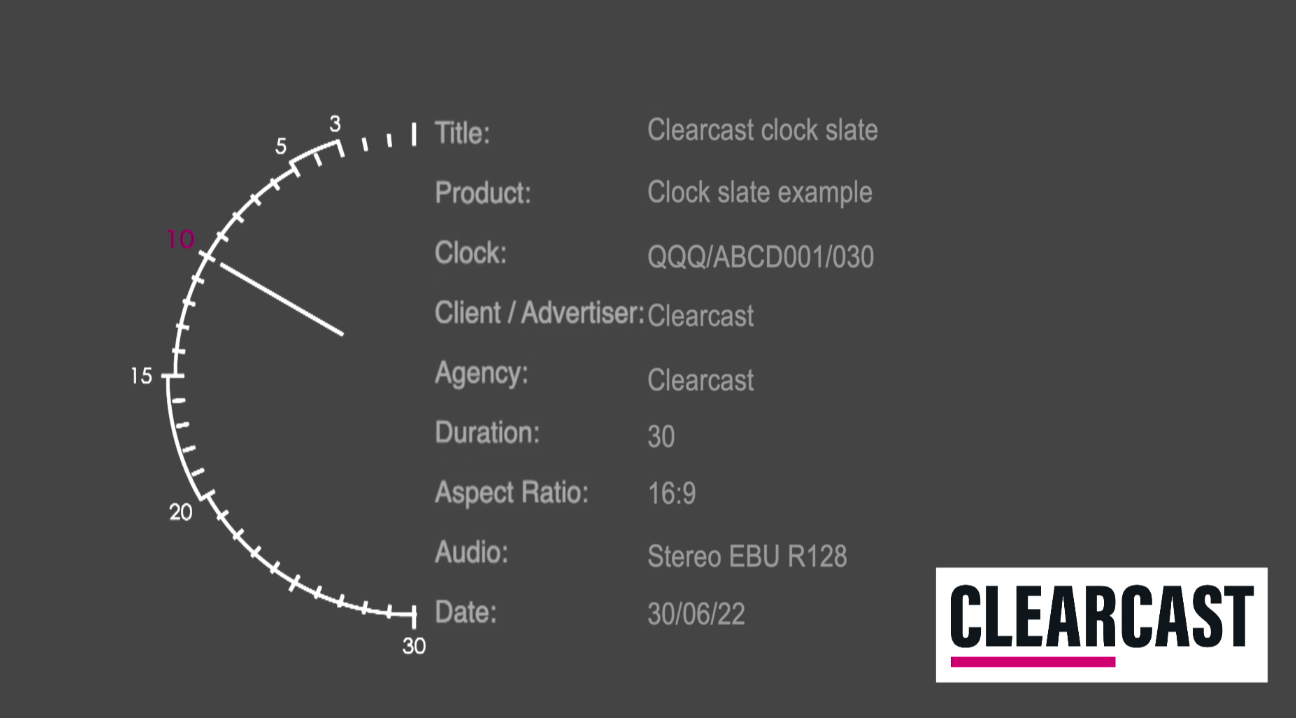
See an example clock slate video here: Clearcast clock slate
For the full detail, see our Library Technical Specifications.